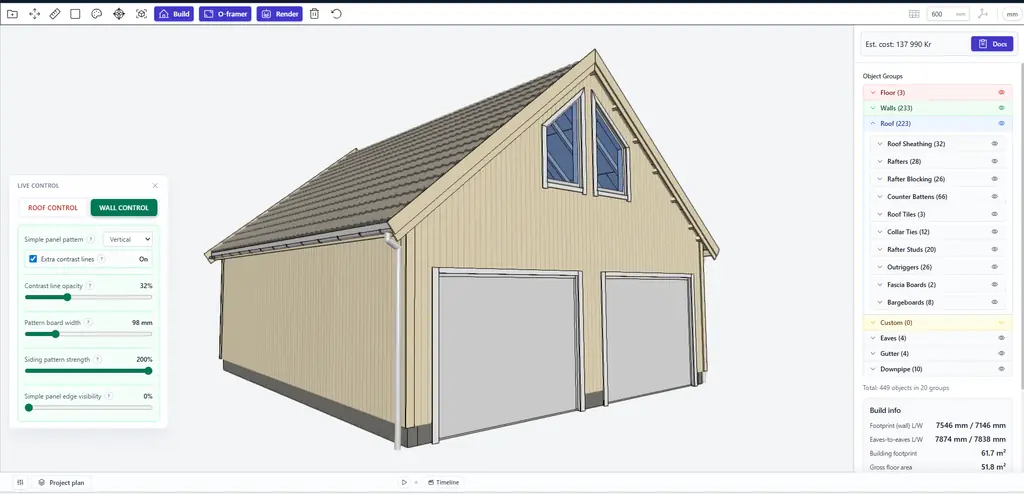
Huge update in Autostrek
You can now create perfect trapezoid windows in seconds with the Opening Framer.
This trapezoid window feature has been available in beta for a while, but it is now fully working with our new simplified siding system.
The second major update is wall siding.
Until now, siding was limited to individual horizontal boards. With this update, you can instead choose a much lighter panel-based wall option. These flat wall panels can also be changed live after the model has been generated, which makes the workflow much faster and more flexible.
The biggest advantage is performance. Large models now feel much smoother because the wall geometry is dramatically reduced. Instead of hundreds of separate boards, the walls can now be made from just a few panels. This is also what makes it possible to support different siding styles and clean trapezoid window framing.
Another nice benefit is a much cleaner bill of materials. Pricing is calculated by square metre or square foot for imperial users, so material lists become easier to read and manage.
Recommended workflow for upper loft windows:
1. Start by placing your main windows, doors, and openings in the lower walls
2. Activate the Trapezoid checkbox in the purple window frame settings
3. Click to place the windows and use the helper guides for precise alignment
You can still use the Boards siding option, and it works well for smaller buildings. However, the trapezoid window feature is designed to work with the simplified panel siding, not individual boards.
We have also included several smaller improvements to overall model quality, speed, and workflow.
Autostrek is now getting close to build number 1000, and we are continuing to improve it regularly.