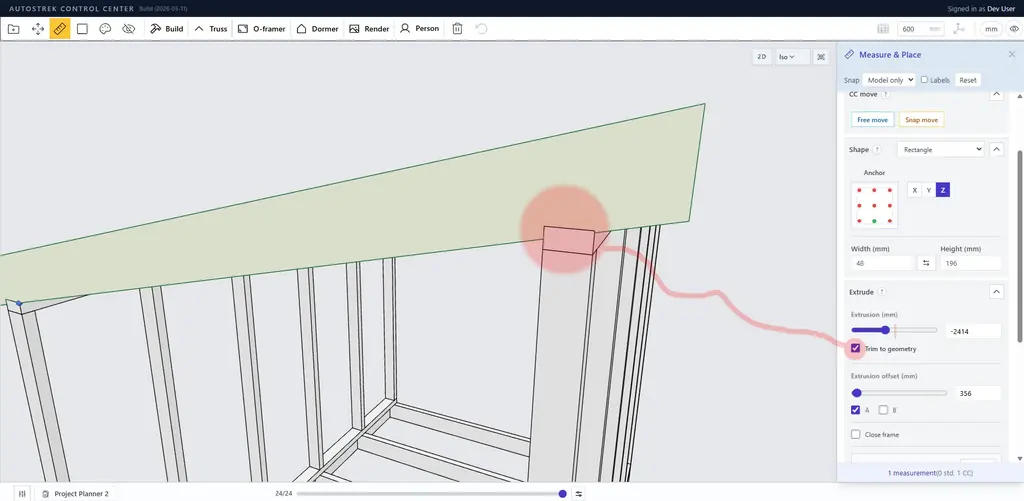
We’ve added a new Trim to geometry option to the Measure & Place tool that makes manual building faster and more accurate.
When enabled, rectangular preview objects can now adapt to nearby construction geometry before they are generated. This makes it possible to create cleaner fitting parts directly from the green preview, without needing to generate overlapping objects and clean them up afterward.
A typical use case is creating angled members that sit on top plates or beams. For example, rafters can now form practical birdsmouth-style cuts where they meet supporting geometry. The preview updates before generation, so you can move, rotate, extrude, and adjust the part while seeing the fitted shape.
The feature is designed as an analytical geometry fit, not a CSG/boolean cut. That means it is intended to produce clean, simple member shapes from box-like construction geometry and planar faces.
Current scope:
Works with rectangular Measure & Place shapes.
Fits against box-like model geometry and planar faces.
Supports birdsmouth-style seat and plumb cuts.
Preserves bevel-end settings when trim is active.
Applies to both previews and generated objects.
This is a first version of the feature, so the focus is on common construction-style fitting rather than complex freeform intersections. The goal is to make Measure & Place more useful for creating real framing parts that need to meet existing geometry cleanly.